
Meet the new Swish Finance home page
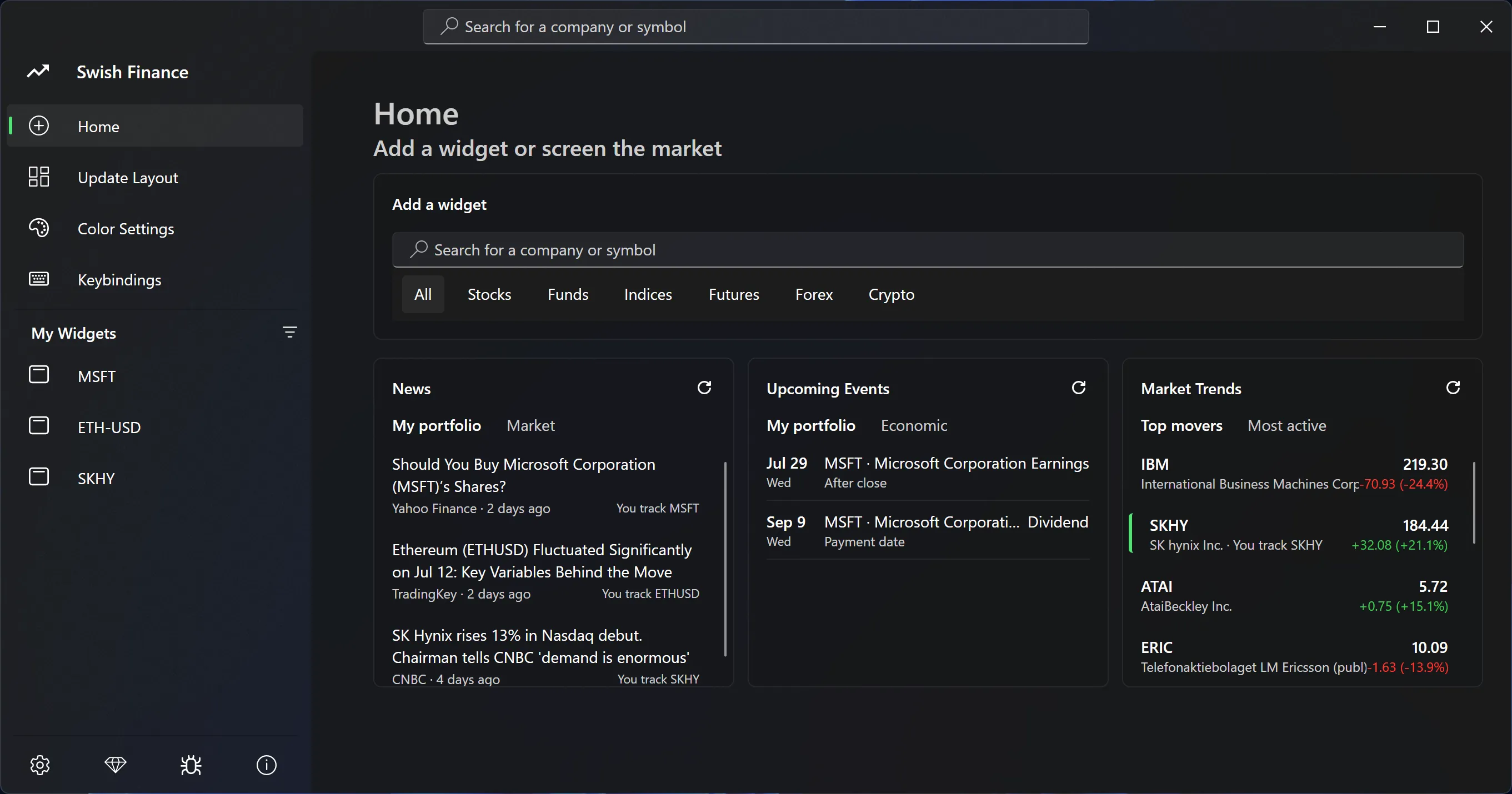
Swish Finance v13 is now live. The biggest change in this version is the new home page, giving you a view of the market and an opportunity to discover your next widget.
This is already the thirteenth version of Swish so far in 2026. Alongside the new home page, I have spent this year making Swish smoother, easier to use, and more dependable. Many of those improvements started with your feedback, sent through the app - as is the case with lots of other features for the past 6 years of Swish's existence.
New home page #
The new home page gives you a convenient view of the market at a glance. Even though the home page is still in its infancy (there are still lots more things I'd like to do), I hope you find the feature set useful nevertheless. You will now find:
- news articles for the widgets you are tracking,
- broad sector news,
- trending tickers (based on trading volume),
- upcoming earnings, dividends, and stock splits for the instruments in your portfolio,
- and upcoming economic events.
Stock widgets continue to remain the core focus of the app. However, the home page adds a new "discovery" aspect to the app which was never there before. I hope to get your feedback on what you like and what can be done better!
Improved ergonomics #
The context menu - both when right-clicking a widget, and when right-clicking the tray menu icon - has seen numerous improvements in 2026. The goal of these improvements is to make Swish more effortless, and to provide what's useful to you at your fingertips instead of deep down in a menu.
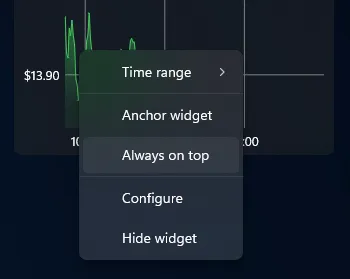
Right-click any widget and you will be presented with the following new options:
- Configure - takes you directly to the symbol page in the Settings UI,
- Always on top - toggle floating the widget on top of all other windows,
- Anchor widget - locks the widget's position and size.
Use the system tray icon in the bottom right of the taskbar to:
- Align to target - click the widget which all others should align to,
- Lock all widgets - freeze the layout of all your widgets at once,
- Time range - instantly set the time range for all your widgets at once.
In addition to all these new context menu commands, you will also find ease-of-use improvements in the Swish Settings itself. One great new example is the powerbar at the top of the display. This means one less click for searching for new widgets. In fact, you can now do it in zero clicks by using the new keyboard shortcut Ctrl + E.
Details you can feel #
I care a lot about how Swish feels when you use it. Animations are part of what contributes to that "feel". However, animations should not distract you from the data or slow you down. Instead, they should make changes easier to follow and the app feel more connected to your input.
Part of what sets Swish apart is that it's a native Windows application. Swish makes heavy use of the Windows composition engine in order to give you unmatched responsiveness and performance. One small example is the acrylic background you see behind each widget. Previously, the background had to wait for Swish to receive a resize event before catching up with the window. The delay was only one or two frames, but I found it noticeable.
The acrylic background is now resized directly by the Windows compositor, keeping it attached to your mouse cursor while you resize a widget. You may also notice the same attention to detail when widgets appear at startup, when charts update, and when you interact with them. These are small changes, but together they make Swish feel at home on Windows 11.
More data, available to more people #
One of the biggest changes this year came with version 11 when I decided to give everyone access to real-time chart data for free. In addition, free users can now add up to one crypto or ETF for free, alongside other stocks.
Version 12 introduced live spot prices for gold, silver, oil, and other commodities. Later, the widget catalog expanded further, adding many more futures, commodities, CFDs, COMEX, and crypto symbols. In order to make the larger catalog easier to explore, the Add Widget page now lets you filter by stocks, funds, indices, futures, forex, and crypto.
Swish also gained support for seven additional currencies and four new display languages. There is still plenty of work to do, but the app can now serve more markets and more people than it could at the beginning of the year.
The less visible improvements #
Not every improvement makes for an exciting screenshot. Throughout 2026, I have fixed charts becoming stale during pre- and post-market trading, sped up recovery after a network interruption or waking from sleep, and made widget placement more reliable when monitors are connected or disconnected.
Energy-efficient rendering is now enabled by default, and Swish handles low memory, low disk space, and lost graphics devices more reliably. These changes may be less noticeable than the new home page, but they are just as important when Swish is running on your desktop every day.
You can find every feature and fix in the complete changelog.
Built with your feedback #
Swish has been shaped by your feedback throughout its six-year history. This year alone, your suggestions (sent through the app) directly influenced:
- snap to grid,
- commodity widgets,
- the new Configure context menu option,
- adding multiple widgets for the same symbol,
- and backup and restore.
The last two arrive with version 13 for Swish Pro customers. You can now add as many widgets for the same symbol as you need and configure each one differently. Under Settings -> Backup and Restore, you can create a full backup of your widgets, preferences, and layout, then restore it when you need it.
I will not name anyone here because those conversations were sent privately, but I do want to give the Swish community credit. I read every message, and the practical details you share often reveal opportunities I would not have come up with on my own. I owe a big "thank you!" to everyone who took the time to send feedback and help improve the app.
Swish Finance v13 is available now. If Swish is new to you, download it and build your own market workspace. Real-time charts are free, and it only takes a few minutes to get started.
If you already use Swish, I would especially like to hear what you think of the new home page. What is useful, what is missing, and what should be made easier next? Send your feedback through the app or email [email protected].
- Next: Simulated Holdings is Leveling Up
- Previous: Introducing Swish